
Smart Home
Smart Home Gadgets in Pakistan: What to Know Before Buying
Smart home technology is no longer limited to expensive automated
If you’ve lived through even one Pakistani summer, you already......
If you’ve lived through even one Pakistani summer, you already know the drill. The heat climbs past 40°C, the fan is the only thing keeping you sane, and then right on cue the power goes. Load shedding doesn’t care that it’s 2 PM and you’re melting at your desk or that it’s midnight and your kids finally fell asleep.
That’s exactly why so many households across Pakistan have started keeping a rechargeable fan around. It’s not a luxury gadget anymore; it’s closer to a basic survival tool for the summer months. But here’s the catch walk into any electronics market in Lahore, Karachi, or Rawalpindi, or scroll through an online store for five minutes, and you’ll find dozens of options that all claim to be the “best.” Some are genuinely good. A lot of them are cheap imports that die within a month.
This guide is meant to cut through that confusion. We’ll walk through the different types of rechargeable fans available in Pakistan, what actually matters when you’re comparing them, and how to avoid wasting money on something that stops holding a charge before the season is even over.
Not everyone can afford a UPS, a generator, or a solar setup and even if you can, those systems take space, money, and proper installation. A rechargeable fan solves a smaller but very real problem: keeping air moving in a room when the grid shuts off, which is exactly why it’s become one of the most searched essential gadgets for Pakistani households every summer.
You charge it while there’s electricity, and when load shedding hits, it just keeps running. No wiring, no technician, no maintenance headache. For students studying at night, parents trying to keep a baby’s room cool, or anyone working from home through an unscheduled outage, it’s a small investment that pays for itself the first time the lights go out.
Not every rechargeable fan is built for the same job. Before you buy one, it helps to know which category actually fits your situation you’ll find most of these listed under Home Gadgets on our store.
These are the closest thing to a normal electric fan, just with a built-in battery. They’re tall, oscillate side to side, and are meant to cool an entire room rather than one person.
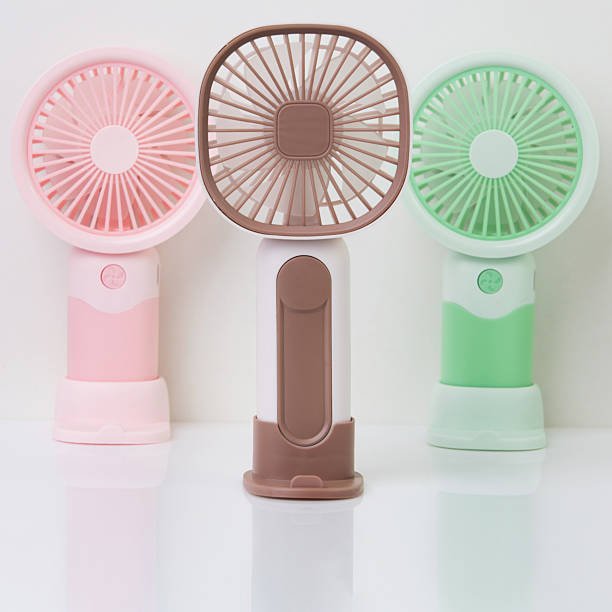
Smaller and lighter, these sit on a table or shelf and are meant for personal cooling rather than a whole room.
Compact enough to slip into a bag, these are built for cooling just you, not a room.
Worn around the neck, these leave your hands free while still giving you a steady stream of air.
Once you know which type suits your needs, the real decision comes down to a handful of practical factors.
This is the single most important spec. Battery capacity is usually measured in mAh, and roughly speaking, the higher the number, the longer the fan will run before it needs charging again. But don’t just look at the mAh figure in isolation always check the actual backup time listed for the speed you’re likely to use, because running a fan on high speed drains it much faster than on low.
As a rough guide:
| Fan Type | Typical Battery | Backup Time (approx.) |
| Stand / Pedestal Fan | 4000mAh and above | 4–7 hours |
| Table / Desk Fan | 2000–4000mAh | 3–6 hours |
| Mini / Handheld Fan | 1200–2000mAh | 2–4 hours |
| Neck Fan | 1200–2000mAh | 3–5 hours |
Treat these as a starting point, not a guarantee always check the seller’s actual specs before buying.
A high battery number doesn’t mean much if the airflow itself is weak. Look for fans with at least 2–3 speed settings so you can switch to a gentler setting overnight and a stronger one during the day. Oscillation is a nice bonus on stand fans since it spreads air across a wider area instead of blasting one direction.
Most fans sold today charge over USB or USB Type-C, which means you can often use the same charger you already own for your phone. Faster charging matters more than people think a fan that takes half a day to charge isn’t much use if load shedding hits before it’s ready. Keeping a reliable power bank on hand also means your fan never runs dry, even during longer outages.
A fan that’s too loud becomes annoying fast, especially at night. If you’re buying one for a bedroom or a study desk, it’s worth checking reviews or asking the seller about noise levels before committing, particularly on the higher speed settings.
This is where a lot of buyers get burned. Unbranded, ultra-cheap fans often use low-grade batteries that stop holding a charge within weeks, forcing you to buy a replacement mid-summer. Sticking to a recognisable brand, checking seller ratings, and reading genuine customer reviews goes a long way toward avoiding that mistake.
It’s tempting to just grab the cheapest option, but a fan that dies in a month costs you more in the long run than a slightly pricier one that lasts several summers. Think of it as buying value, not just a low number on the price tag.
A rechargeable fan is only as good as the battery inside it, so a bit of care goes a long way.
There’s no single “best” rechargeable fan for everyone the right pick depends on whether you need to cool a whole bedroom, a work desk, or just yourself while you’re out and about. What matters is matching the fan type to your actual routine, paying attention to real battery backup rather than just the mAh number on the box, and choosing a seller you can trust over the cheapest option you can find.
Get that part right, and a decent rechargeable fan can carry you through even the harshest load shedding schedule without breaking a sweat — literally. Ready to look at real options? Browse our full range of gadgets online and filter by what fits your budget and your room.
Q1: How many hours of backup should a good rechargeable fan give? It depends on the type and speed setting, but a reasonable expectation is 3 to 6 hours on medium speed for most table and stand fans, and a bit less for mini and neck fans.
Q2: Can I charge a rechargeable fan with a power bank? Yes, most USB-charging fans can be topped up with a standard power bank, which is handy during extended outages.
Q3: How long does a new rechargeable fan need to charge the first time? Most manufacturers recommend a full charge of around 6 to 10 hours before first use to help the battery reach its full capacity.
Q4: Are bladeless neck fans safe for children? Generally yes, since there are no exposed blades to worry about, making them a safer option around kids and long hair compared to blade-based designs.
Q5: Why does my fan slow down after running for a while? As the battery discharges, voltage drops and speed reduces naturally. Dust on the blades or an ageing battery can also cause this to happen sooner than expected.
Smart home technology is no longer limited to expensive automated

If you drive in Pakistan, you already know the struggle:

Choosing a humidifier is not just about picking the most